Navigation : Previous | Next Navigation generale :
 OM-Chant 2.0 User Manual
Installation
The Chant synthesizer must be installed prior to use the OM-Chant library.
Chant
In OM-Chant 2.0, a working version of the Chant synthesizer is distributed within the library.
In previous versions, or in case the synthesizer has been installed separately, it can just be unpacked and copied anywhere on the computer.
Configuration in OM
Once the OM-Chant library is loaded in OM, the Chant item is added to the
Externals tab of the main Preferences window.
The button  permits setting or modifying the path
to the Chant synthesizer used by OM-Chant.
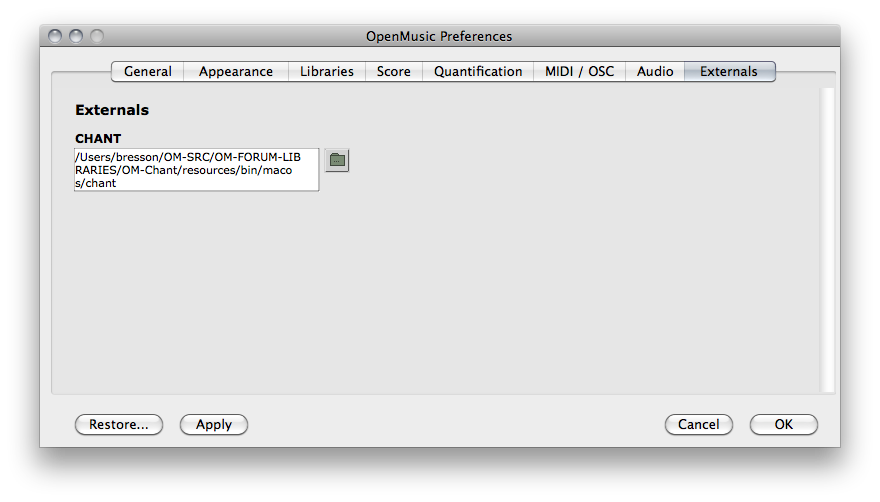
The OM preference windows, with OM-Chant library loaded.
—|—
The default configuration for the Chant path shall point to the resources
folder in the library. Use Restore if needed in order to reset this default
path.
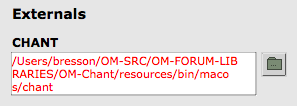
If Chant is missing or not found, the path will be displayed in red.
Use to set the correct path, then validate using
Apply or OK.
—|—
Tutorials
Use the Help/Import Tutorials/Libraries/OM-Chant/ menu from the workspace
window in order to import the OM-Chant tutorial/example patches.
References :
Plan :